Free during beta
Write better everywhere. Without leaving the page.
A browser extension for LinkedIn creators and professionals who write 50+ messages a day
Input Win is a free browser extension. AI rewrites, right where you type. Describe your goal, get suggestions, apply with one click — on LinkedIn, Gmail, chat, or any text box.
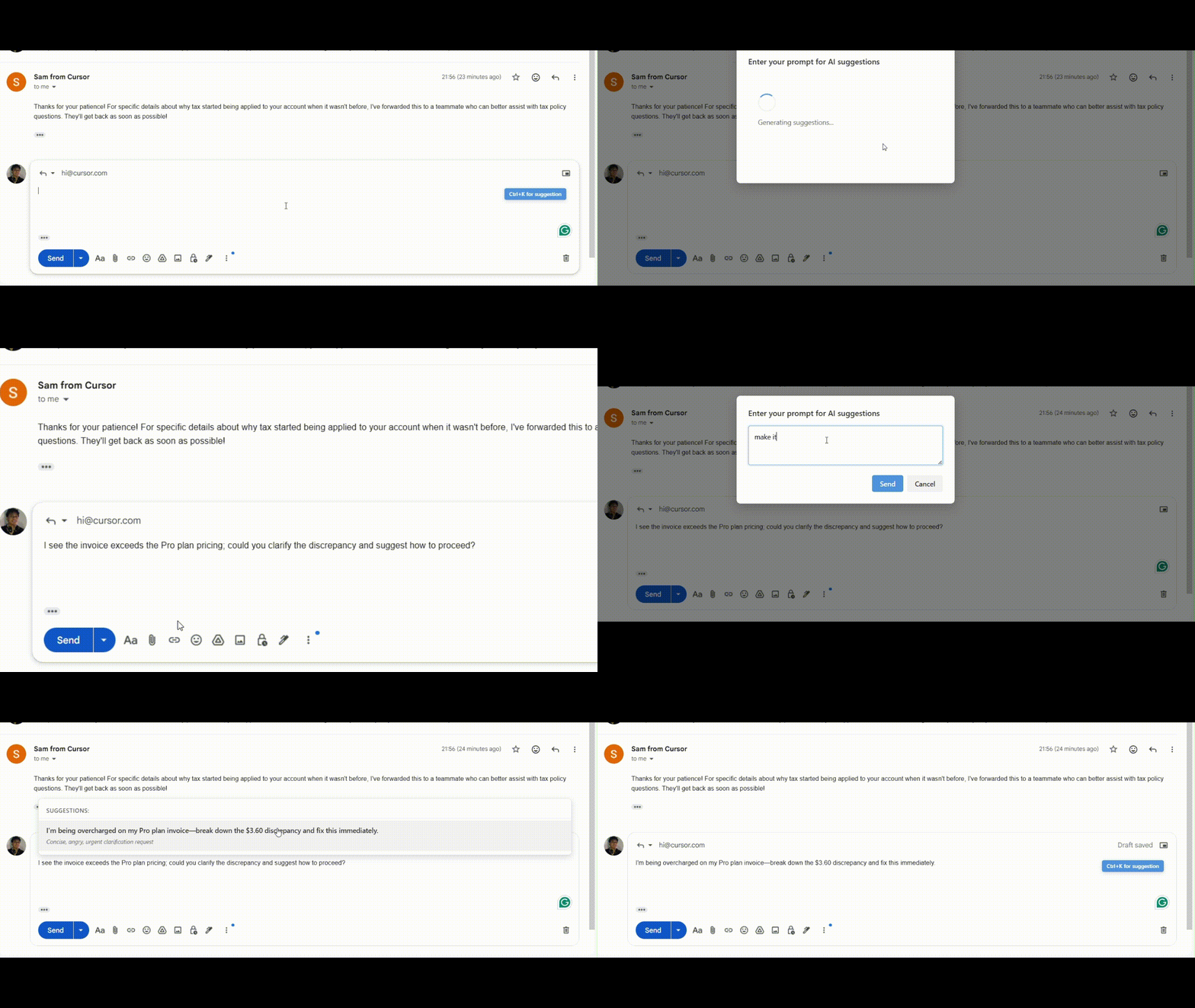
See it in action: type your goal → get rewrites → apply with one click


See it in action
Watch the browser extension work: type your goal in plain language, get AI rewrites, apply with one click. No switching tabs, no copy-paste.
- Works everywhere — LinkedIn, Gmail, chat, forms, any site
- Your goal, your words — "more professional", "shorter", "friendlier" “Make this post best in the world and concise”).
- One-click apply — suggestions replace your text in place
- Press Ctrl+K / Cmd+K in any text box to open
Browser extension features
| Feature | What you get |
|---|---|
| Works everywhere | Any input or text area on any site. |
| Your goal, your words | You describe the goal (e.g. “more professional”, “shorter”, “friendlier”). |
| Context-aware | It can use what's around the input (e.g. post title, page) to improve suggestions. |
| One-click apply | Choose a suggestion and it replaces your text in place. |
| Simple login | Sign in once; the browser extension remembers you. If you're not logged in, it tells you clearly. |
| Keyboard shortcut | Press Ctrl+K (Windows/Linux) or Cmd+K (Mac) while in a text box to open the suggestion prompt. |
| Clean, light UI | Same look on every site: a small badge, a simple prompt box, and a list of suggestions. |
How you use it (step by step)
- Install the browser extension (Firefox or Edge above) and sign in when asked (or when you first try to get suggestions).
- Go to any site and click or focus any text box (LinkedIn post, chat, form field, etc.).
- Open suggestions by clicking the suggestion badge near the input, or press Ctrl+K / Cmd+K (Mac).
- Enter your goal in the popup — e.g. “Make this post best in the world and concise, at least 256 characters.”
- Wait a moment — the extension sends your text and goal (and a bit of context) to get AI suggestions.
- Pick a suggestion from the list and click it; your text in the box is updated.
If you're not logged in or your session expired, you'll see a short message and a link to log in again.
Problems it solves
| Problem | How the browser extension helps |
|---|---|
| “I'm not sure how to say this better.” | You describe the goal; AI suggests improved versions. |
| “I don't want to leave the page to edit.” | Suggestions appear next to the box; apply with one click. |
| “It doesn't work in my app/site.” | It's built to work in inputs across sites (including complex ones like LinkedIn). |
| “I forget to log in or my session expired.” | Clear “please log in” message and link when needed. |
| “The UI looks different on every site.” | The browser extension UI (badge, prompt, suggestions) uses a consistent, light style. |
Who it's for
- People who post on LinkedIn and want stronger, more concise, or more professional text.
- Anyone who writes in forms, chats, or comments and wants quick rewrites.
- Users who prefer one browser extension that works the same way wherever they type.
Input Win is a browser extension that puts AI writing help inside the text box you're already using, so you can describe your goal and apply better text with one click — on any site.
Ready to install the browser extension?